
|
or |
Click![]() Trial Download Request |
| F u l l F e a t u r e d A f f o r d a b l e P h a r m a c y S o f t w a r e |
| News: Click => ApotheSoft Daily Message * Visit the ApotheSoft BLOG * | Integrated Features | ||||||||
Providing Small Pharmacies State of the Art Affordable Prescription Filling SoftwareThe ApotheSoft family of software was designed by a Pharmacist who fills prescriptions everyday with our software. We strive to make software easy to use and
affordable. The ApotheSoft system does dual third party insurance billing. The ApotheSoft program has been designed and is intended for small retail pharmacies that have script volumns of 100 or so per day. The program is not intended for high volumn pharmacies. Nor, do we recommend the program for use on a Server-network setup, Cisco Server network, or other such network setups. Optional modules include Lexi-Comp, the official drug reference for the American Pharmacists Association and a remote encrypted automatic off-site backup.
Click for more information
Visit Net-Rx
our preferred vendor for claims switching.
|
Drug
Interaction SolutionsThe ApotheSoft system has can handle automated Drug / Drug Interactions if your purchase the optional Lexi-Comp On-Line drug interaction and drug information module. The Lexi-Comp OnLine module also includes Patient Leaflets in over a dozen languages as well as drug pictures and full monographs. Internet access is required. Data
Backup SolutionsData and system backup is an important task for any computer system. Your pharmacy is no exception. ApotheSoft has an optional off-site backup system that stores your complete prescription filling system (data and software) in an off-site storage facility automatically every night. Your valuable data is even stored in two geo-redundant data centers nearly 1,000 miles apart - just to make sure. In the event of a
disaster you can be up and
running on any
PC, even one from Wal-Mart, in minutes without any exotic install
process. Just copy the back up to the new PC and you are
ready to start filling scripts.
Note this is not a full
computer backup but is for ApotheSoft data and programs only.
If you need a full system backup visit one of our preferred partners Net-Rx
for full computer backup solutions.
|
||||||||
The History of ApotheSoft ApotheSoft
Software was designed
by a Pharmacist
and is used in his
pharmacy everyday.
It started over 12 years ago
when there was no
affordable pharmacy software for small independent pharmacies.
Marty, an RPh with his own pharmacy, decided to
turn part
time software engineer and build his own pharmacy system. At
that
point a character based (DOS) application made sense. Word
got
around and others wanted to use this friendly software so a software
business was born.A few years ago when HIPPA became a requirement and insurance claims needed to be transmitted over the Internet with an encrypted connection a software engineer was hired to create a new insurance transmit module. From that point a association between ApotheSoft, LLC and SimplyBasicSoftware, LLC was formed to redevelop the original PPS system into a true Windows based application and ApotheSoft was born. Today the ApotheSoft system is a fully integrated Windows based system that continues to evolve to meet the needs of the small pharmacy. The ApotheSoft system is based on years of experience by a real pharmacist filling real prescriptions every day. A pharmacist that also understands software. |
Additional Features Multi
User Without
a ServerThe system was designed to be simple and allow multi-user access on a simple pharmacy Peer to Peer network. No Big Server is required. This makes maintenance simple even if you are not a computer expert. If run on a peer-to peer local area network, we recommend no more than two work-stations. The program is not intended for high volumn pharmacies. Nor, do we recommend the program for use on a Server-network setup, Cisco network, or other such network setups. Dual
Insurance BillingDual insurance processing was built in from the beginning in the Windows version. If your insurance tables are setup billing secondary insurance is only a mouse click away. Tabbed
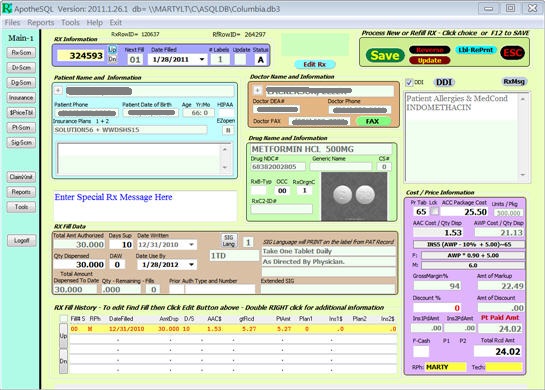
InterfaceThe main user screen integrates EVERYTHING you need in multiple tabs (see screen shots). You can flip from patient, to doctor, to drug in the middle of filling an Rx and never loose a keystroke. You never have to start over to check the profile of another patient that just called on the phone while filling a script or check a price. Flexible
Label PrintingApotheSoft includes a simple label formatting command language that allows very flexible user defined labels if you desire. Labels can include nearly everything on a script plus pictures and logos. The system supports up to 4 SIG languages for flexible patient messages on labels. Keyboard
AND
Mouse CentricThe old character based version of the program was very keyboard centric. Although not seen much today it allowed very efficient data input. One of our high volume customers uses the ApotheSoft system and can fill over 500 scripts on a single computer in one day. If you are a mouse user that works too just as you would expect in any Windows program --- The best of both worlds. Lots
of
shortcuts for efficiencyNo Windows Maze of Options - Lots of keyboard shortcuts make script input a breeze. Example: In the quantity dispensed field you can enter: 3 * 14 and the system will do the math and input a quantity of 42. The total amount authorized accepts a quantity or various PRN formats like PRN6M for 6 months, PRN30D for 30 days, etc. Remote
Support is a BreezeA remote support module is built in to the system but you are in total control. You can contact support and we can remote control your PC to see exactly what you see. Unlike most remote control systems you are in control not the support center and you connect to us not the other way around. Because of this unique architecture it works behind most firewalls with no changes. Download the trial today to see
how friendly and full featured pharmacy software can be.
|
||||||||
|
Screen Shots Click the images below for a full size view - Or click here for a complete list Here is the main RX filling screen ![]() Patient Information Screen ![]() Patient Profile Screen (Summary) Patient Profile Screen (Detail)
![]() |